Aiderra OS · For care organisations
Your business runs on people. Give them an AI-powered back office.
Aiderra OS runs the operational side of a care organisation as a set of departments: reception, sales, marketing, finance, compliance and customer success. AI does the preparation. Your people make the decisions, and every one is recorded.
14 days free. No card. Set up in an afternoon.
- Nothing reaches a customer without a person’s approval
- Every action in a tamper-evident audit trail
- One switch pauses the whole workforce
- Built in the UK, for UK care providers
What Aiderra OS is
The operational layer behind a modern care organisation.
Aiderra Care Management runs the care: rotas, care plans, observations. Aiderra OS runs everything around it: the phone that rings at eight in the evening, the invoice that needs chasing, the article that should have gone out last week, the obligation with a date on it.
It is a multi-tenant platform. Every organisation has its own workspace, its own data, its own users and permissions. Inside it, work is organised the way a business is: by department, each with a small team of AI agents and a person who decides.
How the platform is put togetherDepartments
Ten departments. Switch on the ones you need.
Each department is a team of agents with a job, a set of rules, and a person it answers to. They start switched off. Most organisations begin with one.
Reception
Answers the phone in seconds, at eight in the evening and at weekends. Books visits, takes messages, puts urgent callers through to you.
Sales
Finds and enriches leads, qualifies every enquiry, and keeps follow-up going so nothing goes cold.
Marketing
Articles, landing pages and social posts written in your voice and published to your site, or to pages Aiderra hosts for you.
Finance
Raises invoices, follows up late payment persistently and courteously, and flags unusual charges early.
Compliance
Tracks obligations to their dates and checks every piece of outbound writing against your own rules.
Customer Success
Onboards new customers and watches account health, so the ones about to go quiet reach you while there is time.
The AI workforce
Agents with names, jobs and limits.
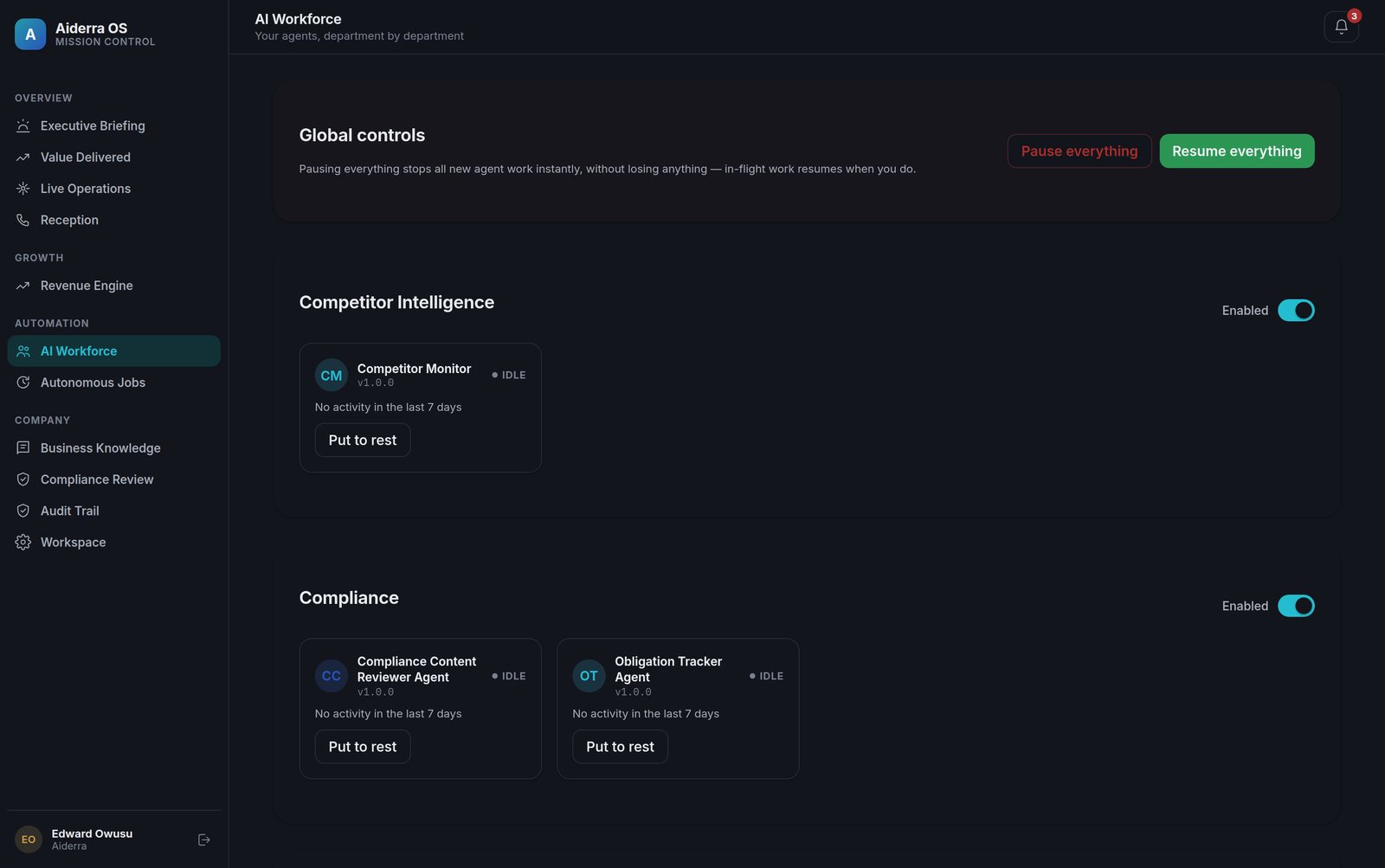
Every agent works from your business profile and nothing else: your services, your prices, who you serve, the things you never want said. It cannot act outside its department, and it cannot send anything on its own.
- Grounded in your facts. A ten-minute profile is the only thing an agent knows about you.
- Scoped by department. Finance cannot touch marketing. Reception cannot raise an invoice.
- Pausable at every level. One agent, one department, or the whole workforce.
Human approval
AI prepares the work. A person decides.
Every email, call list, invoice and published page stops at an approval you can see on one screen, on your phone. Approve it, send it back with a note, or reject it. That rule is not a setting an agent can change.
- Approve, send back or reject, with a reason recorded
- See exactly what will go out, to whom, and why
- Routine work earns autonomy only when you grant it
Send “Invoice 0231, a gentle reminder” to the Meadowbrook House account
To accounts@meadowbrookhouse.co.uk · From Elm Row Care
Hello,
A gentle reminder that invoice 0231, for August’s respite care, fell due on the 19th.
If it has already gone, please ignore this, and thank you.
With thanks, Elm Row Care
Mission Control
The whole workforce on one screen.
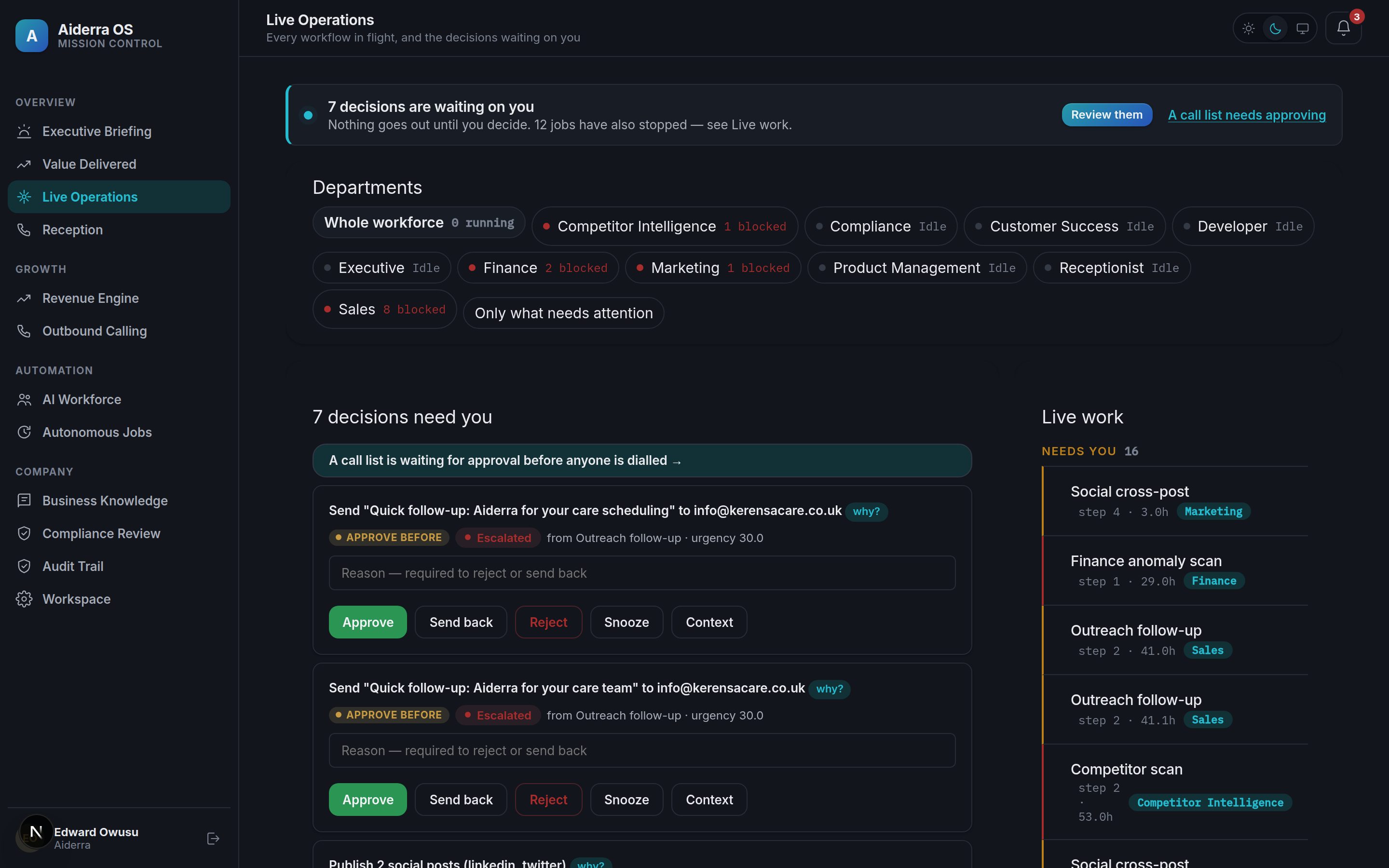
Live Operations shows every department, everything in flight, and the decisions waiting on you. The morning briefing tells you what happened overnight.
A morning briefing, not a dashboard
What each department finished, what needs you, where things stand. In sentences, then numbers.
Every department, one strip
Running, waiting or idle at a glance, with the work in flight behind each one.
An off switch that works
Pause an agent, a department or everything. In-flight work resumes when you do.
Ask the business
Plain-English questions answered from your own data, with the source shown.
Integrations
Connected to the channels a care business already runs on.
Your phone number, your email address, your website and your calendar. Each connection belongs to your workspace and is encrypted at rest.
Phone
A UK number for the receptionist, bought from inside the app, with warm transfer to a person.
Sent in your name with replies to your inbox. Verify your own domain to send from it outright.
Website
Articles and landing pages published to your site, or to pages Aiderra hosts for you.
Calendar
Google Calendar for bookings the receptionist makes, so a visit lands where your team looks.
Security and governance
Built for organisations that handle sensitive information.
Isolation between workspaces is enforced in the database, not just in the code. Every action is written to a hash-chained audit trail. We say plainly what we do and do not yet have.
Workspace isolation
Row-level security in Postgres, with tenant-bound work run on a restricted database role.
Tamper-evident audit trail
Each entry carries a hash of the one before. Change one and the chain shows it.
Approval on outbound actions
Not a preference. The approval gate is part of how every workflow is built.
Roles and two-factor
Owner, operations lead, finance approver and more. Authenticator-app second factor, enforceable per deployment.
How it works
Up and running in an afternoon.
Tell it about your business
Ten minutes. Your services, your prices, who you serve, and the things you never want said. Every agent works from those facts and nothing else.
Turn on the departments you need
Start with one. Connect your phone number, email and website as you go. Everything starts switched off.
Approve, then let it run
At first, everything comes to you. As you build trust, routine work runs on its own. You can see and undo every decision either way.
Pricing
Three plans. Fourteen days free on any of them.
Prices exclude VAT. No card to start. Choose a plan when the trial ends, or do nothing and the workspace pauses with everything kept.
Starter
One department, usually Reception. For a single site that wants the phone answered.
- One department of your choice
- Approvals, audit trail and Mission Control
- Hosted pages for anything it publishes
Growth
Most chosenThe whole back office, under your approval. For an organisation that wants every department working.
- All ten departments
- Content, social posting and outreach
- Your own phone number, email domain and website
Scale
Groups running more than one site, with a head office that needs control across them.
- Everything in Growth
- Higher limits on every channel
- Single sign-on
Questions
The things people ask before they start.
Will Aiderra email or call my customers without my approval?
No. Every outbound action, an email, a call list, a published page, an invoice, stops at an approval you can see on one screen. You approve it, send it back with a note, or reject it with a reason. That gate is part of how every workflow is built, not a setting an agent can change.
How does approval actually work?
When a department wants to do something outward-facing, it drafts the action and writes it to the approval queue with everything you need to decide: what, to whom, and why. You see the exact draft. Approve sends it. Send back returns it with your note and the agent revises. Reject stops it and records the reason.
Every step is written to the audit trail: what the AI proposed, what a person changed, who approved it and when, and what was finally sent.
Where is my data?
Each organisation has its own workspace, isolated from every other by row-level security in the database. Your data is stored in a managed Postgres database in London (AWS eu-west-2).
The application that processes it runs in Amsterdam, in the EU. The AI, telephony and email providers operate outside the UK under the transfer safeguards listed in the privacy policy. If your organisation needs every processor inside the UK, tell us before you start and we will be straight with you.
What do I need to set up?
A short business profile: your services, your prices, who you serve, and the things you never want said. That is enough to start. Your own phone number, email identity and website connect later, from Settings, in a few minutes each.
Run a bigger operation than your headcount.
Start with reception, or with the whole back office. Fourteen days free, no card, nothing sent without you.